Power over Ethernet (PoE) Mesh Node
Platform: Heltec LoRa Series (V3 Lite, V3, or V4)
Overview
A rugged, weatherproof mesh node housed in a standard 4x4x2 electrical PVC junction box powered over an active Power over Ethernet (PoE) line. By decasing an active PoE splitter, removing unused data lines, and fitting a panel-mount RJ45 connector alongside a bottom breather vent, this design delivers reliable 5V power over long cable runs without transmitting network data across the Ethernet line. The setup accommodates various Heltec RF boards and customizable single-cell battery backups for continuous operation.
Bill of Materials (BOM)
| Category / Item | Quantity / Packaging | Link / Supplier |
|---|---|---|
| Enclosure: Carlon 4x4x2 Gray PVC Junction Box | 1 Unit | Home Depot |
| Microcontroller / RF: Heltec Wireless Stick Lite V3, V3, or V4 | 1 Unit | Heltec |
| Antenna: Zdtech 7dBi High-Gain Fiberglass Antenna | 1 Unit | Amazon |
| RF Cabling: U.FL / IPEX to N-Female Bulkhead Adapter | 1 Unit | Amazon |
| Power / PoE Conversion: ANVISION Active 48V-to-5V USB-C PoE Splitter | 1 Board | Amazon |
| Power Input Port: Waterproof Panel Mount RJ45 Connector | 1 Unit | Amazon |
| Backup Battery: 3000mAh Single-Cell Li-Ion (or compatible) | 1 Cell | Amazon |
| Pressure Equalization: Waterproof Breather Screw Vent | 1 Unit | Amazon |
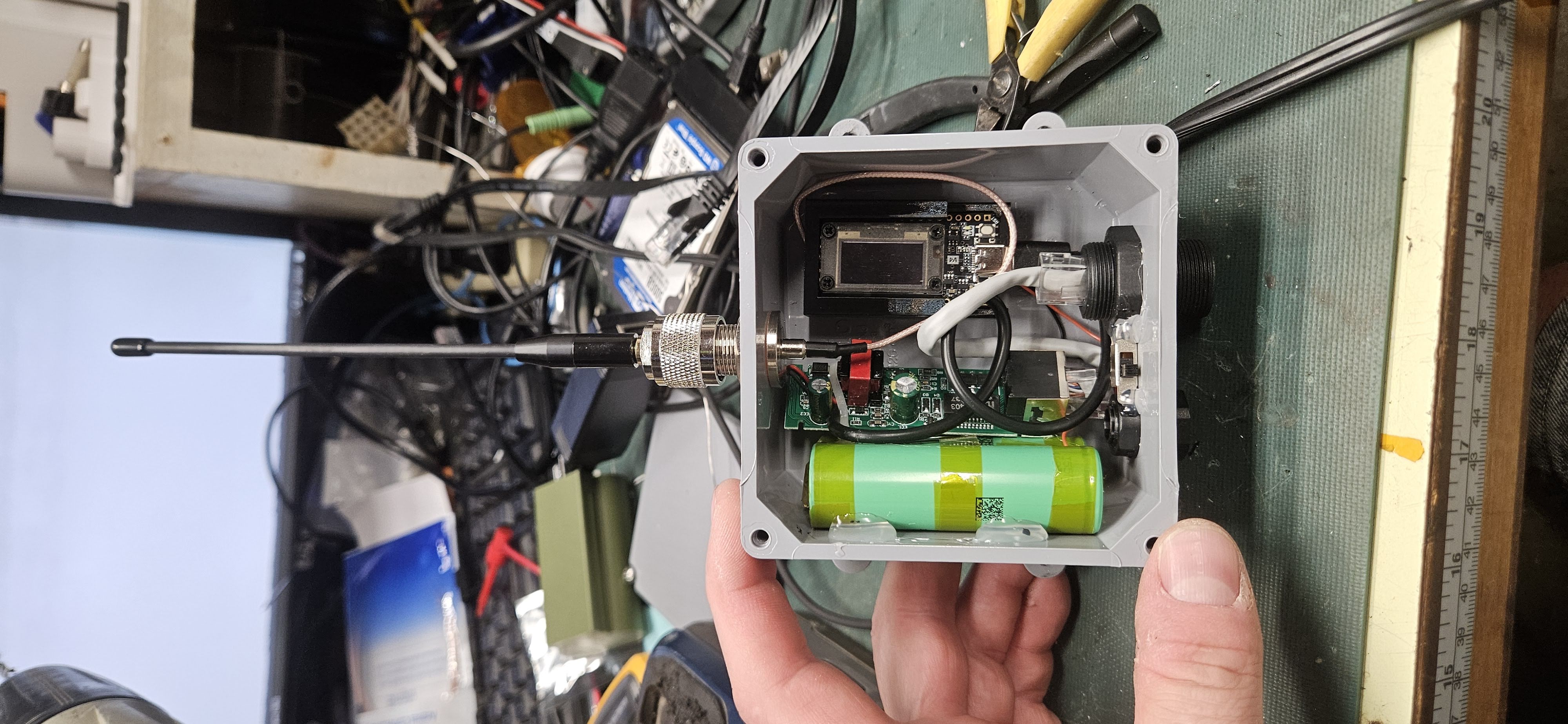
Build & Assembly Steps
Step 1: Enclosure Drilling & Port Layout
Prepare the PVC junction box by marking and drilling the access ports:
- Drill a top port for the N-female RF bulkhead adapter.
- Drill two ports on the bottom wall: one for the waterproof panel-mount RJ45 bulkhead connector and one for the waterproof breather screw vent. Keeping all penetration ports on the bottom face protects the interior from direct rainfall while allowing temperature and pressure equalization.
Step 2: PoE Splitter Modification
Unclip and remove the outer plastic housing from the ANVISION PoE splitter to expose the bare PCB.
Desolder or carefully snip off the outgoing Ethernet data cable/jack directly from the PoE board. Since this build utilizes the Ethernet line exclusively for power delivery, removing the data harness frees up critical internal clearance inside the compact 4x4x2 chassis.
Solder or plug the incoming power leads from the waterproof RJ45 panel mount directly to the input side of the PoE board.
Step 3: Internal Component Mounting & Secure Fitment
Mount the internal hardware using a combination of machine screws and hot glue for mechanical stability:
- Secure custom 3D-printed PCB mounting brackets (available on Thingiverse for Heltec boards) to the interior base of the PVC enclosure using short screws.
- Snap or screw the Heltec board (V3 Lite, V3, or V4) into its bracket.
- Mount the bare PoE board along the interior side wall.
- Position the backup Li-ion battery cell securely along the opposite side wall, connecting it to the battery terminals on the Heltec board.
- Plug the USB-C power tail from the PoE splitter into the Heltec board's power input.
Step 4: Antenna Installation & RF Safeguards
Mount the N-female bulkhead connector through the top port of the enclosure using its nut and sealing washer.
Attach the U.FL/IPEX pigtail to the Heltec board's IPEX connector, applying a small dab of silicone or hot glue to secure the fragile joint against vibration.
Thread your deployment antenna onto the top N-connector.
Step 5: Testing & Weatherproofing
Plug an active PoE feed line into the bottom RJ45 jack to verify 5V supply, battery charge circuit activity, and board bootup.
Once power and RF functions are confirmed, align the rubber perimeter gasket and screw down the PVC enclosure lid securely.